Yoto Labels logo - Free Yoto card label generator
ShowcaseAboutFeedback
Yoto Labels logo - Free Yoto card label generator
Support the toolThanks so much!307267Support307267
HomeGuidesShowcaseAboutFeedback
David and Elias

Thanks for thinking of supporting us

David & Elias

Support the tool307267

On this sheet

  • Yoto Label Dimensions
  • How Many Labels Per Sheet
  1. All Guides
  2. /Making labels

Yoto Label Size Guide

DavidDavid
·Updated August 2026
Yoto Label Size Guide

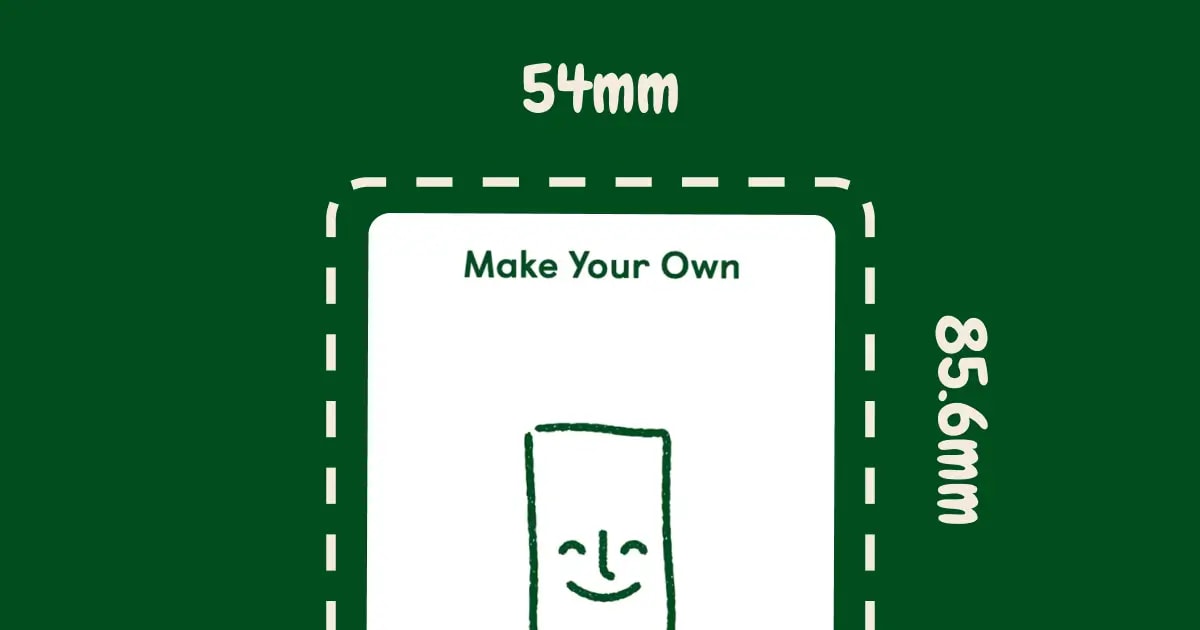
Yoto labels are the same size as the cards: 54mm × 85.6mm (about 2.1" × 3.4").

Note

Quick answer: Make labels 54mm × 85.6mm. If cutting by hand, make them 51mm × 82.6mm (leaves a small white border that's way easier to apply). How many labels fit on different paper sizes and what actually works.

Yoto Label Dimensions

Full size (edge-to-edge):

  • 54mm × 85.6mm (2.1" × 3.4")
  • Covers entire card
  • Looks most professional
  • Harder to apply perfectly

With small border (easier):

  • 51mm × 82.6mm (2.0" × 3.25")
  • Leaves 1.5mm white edge showing
  • Much easier to apply
  • Hides cutting imperfections

I use full size with vinyl sticker paper (it's forgiving during application). Also works fine with regular sticker paper. Used bordered labels when cutting by hand with scissors—many parents do this too since it's easier to line up.

How Many Labels Per Sheet

  • Letter paper (8.5" × 11"): 9 labels
  • Legal paper (8.5" × 14"): 12 labels
  • A4 paper: 9 labels
  • A5 paper: 4 labels
  • 4×6 photo paper: 2 labels

The tool spaces them out automatically for whatever paper size you pick.

Next in making labels
Yoto Card Size & Dimensions

Yoto MYO card dimensions are 54mm × 85.6mm (2.1\" × 3.4\" in inches). Get exact Yoto card measurements for Canva, plus a free tool that auto-sizes labels.

→
Also worth a look
  • Yoto Card Templates→
  • Yoto Label Templates→
Free Yoto label maker

Make printable MYO labels

Add an image or pick a template. Get a PDF sized for Yoto cards, ready to print at home.

Create Labels →

Hi, I'm David. I built this free tool for my kid's MYO cards. Add a pic or pick a template, print a PDF that actually fits.

Make some labels →

The tool

  • Make labels
  • See what others made
  • Browse the guides

How-tos

  • Using the tool
  • Getting started with MYO
  • Making labels at home
  • Organizing your cards

Around here

  • Why this exists
  • Send feedback
  • Buy me a coffee
  • Privacy
© 2026 YotoLabels.comNot affiliated with Yoto Ltd.
Yoto Labels logo - Free Yoto card label generator
ShowcaseAboutFeedback
Yoto Labels logo - Free Yoto card label generator
Support the toolThanks so much!307267Support307267
HomeGuidesShowcaseAboutFeedback
David and Elias

Thanks for thinking of supporting us

David & Elias

Support the tool307267

On this sheet

  • Yoto Label Dimensions
  • How Many Labels Per Sheet
  1. All Guides
  2. /Making labels

Yoto Label Size Guide

DavidDavid
·Updated August 2026
Yoto Label Size Guide

Yoto labels are the same size as the cards: 54mm × 85.6mm (about 2.1" × 3.4").

Note

Quick answer: Make labels 54mm × 85.6mm. If cutting by hand, make them 51mm × 82.6mm (leaves a small white border that's way easier to apply). How many labels fit on different paper sizes and what actually works.

Yoto Label Dimensions

Full size (edge-to-edge):

  • 54mm × 85.6mm (2.1" × 3.4")
  • Covers entire card
  • Looks most professional
  • Harder to apply perfectly

With small border (easier):

  • 51mm × 82.6mm (2.0" × 3.25")
  • Leaves 1.5mm white edge showing
  • Much easier to apply
  • Hides cutting imperfections

I use full size with vinyl sticker paper (it's forgiving during application). Also works fine with regular sticker paper. Used bordered labels when cutting by hand with scissors—many parents do this too since it's easier to line up.

How Many Labels Per Sheet

  • Letter paper (8.5" × 11"): 9 labels
  • Legal paper (8.5" × 14"): 12 labels
  • A4 paper: 9 labels
  • A5 paper: 4 labels
  • 4×6 photo paper: 2 labels

The tool spaces them out automatically for whatever paper size you pick.
Next in making labels
Yoto Card Size & Dimensions

Yoto MYO card dimensions are 54mm × 85.6mm (2.1\" × 3.4\" in inches). Get exact Yoto card measurements for Canva, plus a free tool that auto-sizes labels.

→
Also worth a look
  • Yoto Card Templates→
  • Yoto Label Templates→
Free Yoto label maker

Make printable MYO labels

Add an image or pick a template. Get a PDF sized for Yoto cards, ready to print at home.

Create Labels →

Hi, I'm David. I built this free tool for my kid's MYO cards. Add a pic or pick a template, print a PDF that actually fits.

Make some labels →

The tool

  • Make labels
  • See what others made
  • Browse the guides

How-tos

  • Using the tool
  • Getting started with MYO
  • Making labels at home
  • Organizing your cards

Around here

  • Why this exists
  • Send feedback
  • Buy me a coffee
  • Privacy
© 2026 YotoLabels.comNot affiliated with Yoto Ltd.